A one-page website is a whole business website on a single scrolling page: who you are, how to call, what it costs, proof of your work, how to book, where to find you, your hours and your socials, in that order. For most local businesses, one page is enough. It stops being enough when you want each service to rank, sell a catalog, or publish articles. The builders that do it well, with prices, are at the end.
Checked October 2026 against Google's Business Profile guidelines, Whitespark's 2026 Local Search Ranking Factors, BrightLocal's 2026 Local Consumer Review Survey, and the pricing and help pages of InBio, Carrd, Google Sites, Wix and Squarespace.
What counts as a one-page website, and what doesn't
A one-page website (also called a single-page website or a mini website) puts every section on one URL. The menu, if there is one, scrolls to a section instead of opening another page. In Wix's words, one-page sites "cannot have a regular site menu," so the menu sends visitors to "the relevant part of the page."
It isn't a landing page. A landing page sells one offer to people from an ad, with one button. A one-page business website serves everyone who looks you up, so it carries the phone, the prices, the map and the hours too.
It isn't a list of links either. A link in bio page can be a one-page website, but only when the price, the phone number and the booking sit on it, not on other sites.
Google's rule for the Business Profile website field points the same way. It asks for "a website that represents your individual business location," and bans URLs that "redirect or 'refer' users to landing pages or phone numbers other than those of the actual business, including pages created on social media sites."
Google doesn't name link pages either way. Our reading: a page that carries your own details fits the wording better than one that only forwards people. More in what to use as your Google Business Profile website.
When one page is enough, and when it isn't
One page is enough when the customer has already found you. They saw your profile on Maps, a friend sent your name, or they tapped your Instagram bio. Now they're checking you, then acting.
BrightLocal's 2026 survey of 1,002 US adults puts numbers on it. After reading positive reviews, 54% go on to check the business's website. Overall, 66% keep researching and 34% are ready to buy or book. So the page serves two people: one wants proof, the other wants your number.
One page is not enough in three cases:
- You sell many services and want each to rank. Whitespark's 2026 survey of local SEO experts (published November 2025) ranks "Dedicated Page for Each Service" as the number-one factor for ordinary local results. For the map pack it ranks 24th. A plumber who wants to rank for "water heater repair" and "drain cleaning" needs a page for each.
- You sell a catalog. Twenty products with sizes, stock and shipping need a shop, not a page.
- You publish. Guides, recipes, case studies: that's a site with a blog.
If none of those is you, start with one page. It's quicker to build and to keep right. The guide to making a website for your business compares every route if you're still deciding.
The eight sections, top to bottom
Each section answers the question the visitor has at that point in the scroll. Each also has one common mistake.
- Who, what, where. Your business name and one line that says what you do and where: "Mobile dog grooming in North Austin." Mistake: a logo and a slogan, and no town.
- Call or text. The phone number as a tap-to-call link, with text or WhatsApp next to it. This is for the 34% who are ready. Mistake: the number only in the footer.
- Prices and services. A short list with real numbers: "Men's cut $35. Beard trim $15." Mistake: "Call for prices", which hands the checkers a reason to try the next name on the list.
- Photos and proof. A dozen of your own photos: real work, your space, your truck. Add your star rating as text with a link to your Google reviews; BrightLocal found 37% go on to read more reviews anyway. Mistake: stock photos.
- Book or get a quote. One booking button for appointments, or one quote form for jobs that need a look first. Ask only what you need to reply: name, a way to reach them, the job. Mistake: a form with ten questions.
- Location and map. An embedded map for a shop or salon; 31% of BrightLocal's respondents head to the location after reading reviews. Mistake: a pin on a home address you don't want customers at.
- Hours, as text. Typed out, not a photo of the door sign. Text can be read by screen readers, copied and found in search. Mistake: hours that are wrong by the first holiday.
- Socials. Instagram, TikTok, Facebook and your Google profile, at the bottom. They're where people keep watching, not where they act. Mistake: putting them first, so the first tap leaves your page.
The order bends to the business. A tutor puts booking above prices. Our rule of thumb: the action most visitors came for should be reachable in the first two screens on a phone.
Three outlines: what changes by trade
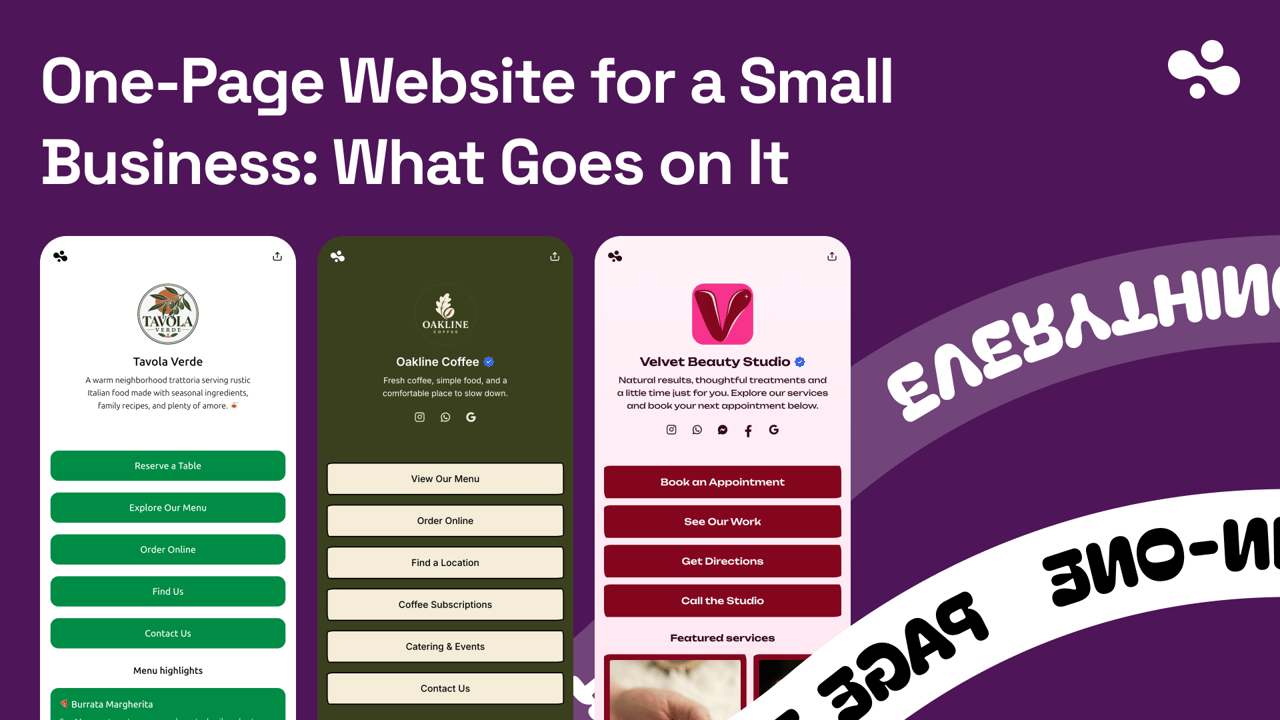
These are illustrative outlines, not real customers. Swap in your own words, prices and photos.
A hair salon: the gallery sells the booking
- "Studio Ana: color and cuts in East Nashville."
- Call, text, Instagram DM.
- Cut, color, balayage, blowout, each with a "from" price and a time.
- Twelve recent cuts and colors, before and after side by side.
- Book online, in the slots you set.
- Map with the place name.
- "Tue–Sat 10–7. Closed Sun and Mon."
- Instagram, TikTok, Google reviews.
Clients book on the look, so the gallery sits right above the booking.
A plumber: towns instead of a pin
- "Reyes Plumbing: repairs, drains and water heaters in Mesa, Gilbert and Chandler."
- Call and text, large. Emergencies call; everyone else texts.
- "Call-out $89, then quoted before work starts."
- Photos of finished jobs, and the license number as text.
- Quote form: name, phone, address, what's wrong.
- The towns you cover, as text.
- "Mon–Fri 7–6. Emergency line 24/7."
- Google profile, Facebook.
The plumber goes to the customer, so there's no map of the home address. That matches Google's Business Profile rule for service-area businesses: "you should hide your business address from customers."
A food truck: today's spot goes second
- "Smoke & Salt: Texas barbecue from a truck in Portland."
- Where we are today, as text: "Thu: Division St pod, 11–8." A map of today's spot below it.
- The menu with prices.
- Photos of the food and the truck, so people recognize it.
- Catering form: date, headcount, location.
- The weekly schedule, with the hours in it.
- Instagram, where the daily post goes.
Every visitor asks "where are you today", and the map follows the truck.
Which builder fits which business
All five make a single page. They differ in how many of the eight sections come ready, and in whether the page can live on your own domain.
| Builder | How one page works | Free plan | Paid from | Your own domain |
|---|---|---|---|---|
| InBio | One page by design | Yes, at in.bio/yourname | $4/mo or $40/yr | No |
| Carrd | Built for one-page sites | Yes, up to 3 sites, Carrd branding | $9/yr | From $19/yr |
| Google Sites | Keep the home page, add no others | Yes | Free | Yes, bought elsewhere |
| Wix | A menu of anchor links on one page | Yes, wixsite.com address with a Wix ad | $17.77/mo, billed yearly | Paid plans |
| Squarespace | Anchor links on version 7.1 sections | No, 14-day trial | $19/mo billed yearly, $25 monthly | Free for a year on annual plans |
Google's own pages don't state a price for Sites; "free" comes from third-party guides. Wix lists USD prices "for reference only", and outside the US prices and taxes differ.
InBio has the contact and proof sections ready-made. Add your phone number as a tap-to-call icon, with text, WhatsApp and email beside it. Paste a Google Maps place link for a live map, and add a gallery of up to 60 photos, all on the free plan. A quote form comes with Pro at $9 a month, and booking with live availability with Business at $29.
The gaps, in one line: no custom domain, no hours or price-list block (hours fit in the 200-character bio line, a full price list sits in a post one tap away), no reviews block, one booking diary per page, and forms always ask for an email. See pricing.
Carrd is plain about its purpose: "Build one-page sites for pretty much anything." It's flexible and cheap. $19 a year buys a custom domain, forms and embeds, which is how you'd add a booking tool. You design every section yourself.
Google Sites costs nothing with a Google account and connects a domain you already own (the address needs a subdomain like www). Forms come from Google Forms. The look is plain. More in Google Sites for business.
Wix is a full website builder. A one-page Wix site uses a menu of anchor links. When you want a page per service, you add it to the same site at the same address. The free site carries a Wix ad; a paid plan removes it and connects your domain.
Squarespace has no free plan. Its 7.1 sections take anchor links, and like Wix it adds pages to the same site later.
Who should pick what:
- A salon, studio or trade that lives on Instagram and Maps, and wants it live today: InBio. Call and text icons, map, photos, then a quote form or booking when you need them.
- Your own domain on one page, for the least money: Carrd at $19 a year, or Google Sites with a domain you buy.
- A page per service within the year: Wix or Squarespace, so the one page becomes the homepage.
Do you need a domain name? covers domain costs and what happens if one lapses.
Build it this week
Open a note and write the eight sections as plain lines: your one-line description, phone, five prices, a dozen photos, the booking or quote step, the address or towns, hours, socials. That note is most of the work.
Then pick the builder from the list above and paste the note in. Put the page's address in your Google Business Profile's website field and your Instagram bio, and open it on your own phone before anyone else does.
The rest of the series is in A website for your business.
We make InBio. Every builder here, ours included, was checked against its own pricing and help pages in October 2026.