You post, people tap your bio link, and then… what? Most creators genuinely don't know. The platforms show you likes and views on the content — but the moment someone leaves for your page, the lights go out. Did they look at anything? Did the TikTok crowd behave differently from the Instagram crowd? Which link earned its spot?
Here's the thing that makes this fixable: your link in bio is your own web page. Not a profile on someone's platform — a page you own. And on your own page, everything is measurable: every visit, every tap, where each visitor came from, what country they're in, what device they're holding.
That's link in bio analytics — and reading them takes a lot less effort than guessing.
In this guide you'll learn: what link in bio analytics are, what you can (and can't) track, how to read the numbers without a marketing degree, and how to turn "huh, interesting" into decisions about what you post and sell.
The short version: in.bio tracks your page automatically — no setup, no code, no cookie banners.
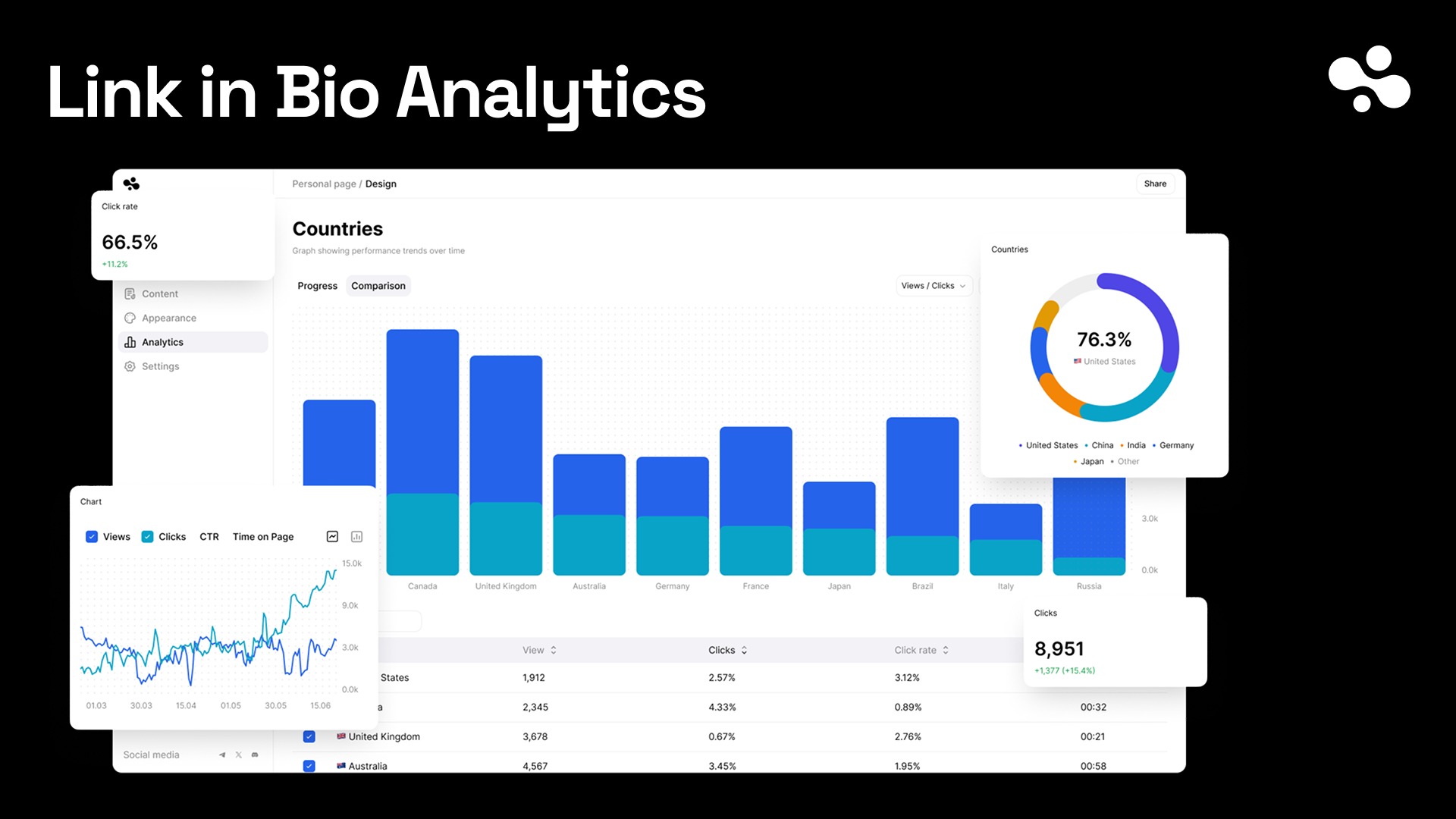
- Every visit and every click — per link, per offering, with what's-performing-best rankings
- Where people come from — traffic sources, countries, and devices for every view
- Followed to the money — every sale and sign-up remembers which source it came from
At a Glance
| Question | Quick answer |
|---|---|
| What gets tracked? | Visits, unique visitors, clicks per link, sources, countries, devices |
| Setup needed | None — it's on from the first visit |
| Can platforms give you this? | No — Instagram and TikTok stop measuring at their exit door |
| Cookies involved | None on in.bio — visitors see no cookie banner |
| Best single metric | Clicks per link (what people actually wanted) |
| Where sales fit | Each sale keeps the source it originally came from |
What Is Link in Bio Analytics? (And Why It Exists)
Link in bio analytics is the measurement layer on the page behind your bio link: how many people visited, which links and products they tapped, and where those people came from.
It exists because of a blind spot. Social platforms measure everything inside their walls — but your bio link leads outside, and their analytics end there. Meanwhile the whole point of the link is what happens after the tap. Without your own numbers, you're posting into fog: you know a video did well, but not whether it sold anything.
Because the page is yours, the fog is optional.
How It Works (No Pixels, No Setup)
When someone opens your page, the page itself quietly notes the visit: where the visitor came from (the referrer — TikTok, Instagram, a Google search), their country, their device type. Tap a link or an offering, and that tap is counted for that specific item.
On in.bio this happens with a tiny signal the page sends on its own — nothing for you to install, no tracking pixels to configure, and no cookies, which is why your visitors never meet a cookie banner. Your own visits to your own page aren't counted, so the numbers stay honest even while you're checking your page for the tenth time today.
Step-by-Step: How to Read Your Analytics
- Open your dashboard — the overview shows visits and unique visitors for your chosen period, with the change against the previous one.
- Check where visitors come from — sources tell you which platform is actually sending people, not which one you're posting hardest on.
- Look at link performance — every link and offering with its clicks and click-through rate, ranked. This is the "what do my people actually want" screen.
- Skim countries and devices — mostly phones, usually; but a surprise country spike often explains a surprise sales day.
- Once a week, act on one thing: promote what's performing, move it up the page, or retire what nobody taps.
What to Watch (By What You're Trying to Do)
- Selling digital products: clicks per offering and its click-through rate. A product everyone sees and nobody taps has a title or price problem, not a traffic problem.
- Growing an email list: sign-up conversions against page visits. If visits are high and sign-ups low, the pitch line is the suspect.
- Posting across platforms: the sources breakdown. Double down where visitors come from, which is frequently not where the most followers live.
- Selling anything at all: the source attached to each sale. in.bio keeps the original source with every sale and sign-up — so "TikTok sent 60% of my visitors but Instagram sent 70% of my buyers" is a thing you can actually see, and act on.
Common Mistakes to Avoid
- Checking daily, changing nothing. Analytics are for decisions, not entertainment. Weekly and decisive beats daily and passive.
- Chasing visits instead of clicks. A thousand visitors who tap nothing are worth less than a hundred who buy. Click-through is the honest number.
- Ignoring sources. Posting three platforms equally when one sends 80% of visitors is effort spent by habit, not by data.
- Judging a link parked at the bottom. Position matters enormously on a small page — move something up before declaring it a flop.
- Forgetting the timezone of spikes. A country spike usually follows a repost or a mention — find the source before the trail cools.
Does It Actually Change Anything?
Only if you act on it — but acting gets easy when the numbers are specific. "My audience" is a guess; "my buyers come from Instagram, my browsers from TikTok, and my top offering converts at triple the rest" is a to-do list.
That last step — connecting traffic to money — is the piece most link tools skip. Counting clicks is easy; in.bio also remembers which source each sale and sign-up originally came from, which turns your analytics from a popularity contest into a revenue map.
The Short Version
Your bio link is the one door between your content and everything you offer — and because the page behind it is yours, everything through that door is measurable: visits, sources, devices, countries, and every single click, down to which sale came from which platform.
in.bio tracks all of it from the first visit, with nothing to set up and no cookie banners — and its analytics follow through to the money, not just the taps.